
When I decided to tackle my notion life operating system template setup, I had reached a breaking point with scattered productivity tools. I was tracking fitness milestones in one mobile app, managing client deliverables in another project tool, and jotting personal goals on paper sticky notes. Everything felt fragmented, and I constantly lost track of the bigger picture while putting out daily fires.
A life operating system unifies your high-level aspirations, quarterly milestones, and daily routines into one integrated digital dashboard. By establishing structured connections between your big vision and everyday actions, Notion transforms from a passive notebook into an active execution engine. In this walkthrough, I outline how I assembled my all-in-one workspace and how you can replicate it with minimal complexity.
Key Takeaways
Here are the structural pillars required for a resilient life operating system:
- Connect daily tasks directly to quarterly goals to ensure purposeful execution every morning.
- Structure your workspace into distinct operational tiers ranging from high vision to daily action.
- Build automated database rollups that display project progress bars without manual updating.
- Incorporate recurring reflection hubs to audit energy levels and pivot stalled initiatives.
- Prioritize fast-loading minimal dashboard views to prevent visual distraction on desktop and mobile.
To skip the design phase and start organizing productive systems immediately, Ready-to-Sell Notion Templates on plrbizhub.com provide professionally formatted digital assets that eliminate setup fatigue while maximizing focus. These tested templates allow creators to launch their workspaces in hours rather than weeks.
Understanding The Multi-Tier Architecture
An effective life operating system functions through hierarchical levels of perspective, drawing principles from classic systems thinking. Without distinct organizational tiers, daily chores quickly drown out long-term strategic projects. I split my workspace into three interconnected operational layers.
The top tier represents Vision and Values. Here I document overarching life aspirations across key pillars such as Health, Financial Independence, Career Growth, and Relationships. The middle tier consists of Objectives and Key Results (OKRs) along with active Projects. Each project has a measurable finish line and links back to an overarching vision pillar. The bottom tier houses daily actions, habits, and task logs that drive the engine forward.
Configuring The Master Goal Database
The Goals database serves as the guiding compass of my entire Notion setup. I configure each goal entry with specific properties: Category Tag, Target Quarter, Progress Formula, and a relation to the Projects database. This structure forces me to define exactly how each goal will be achieved through concrete projects rather than vague aspirations.
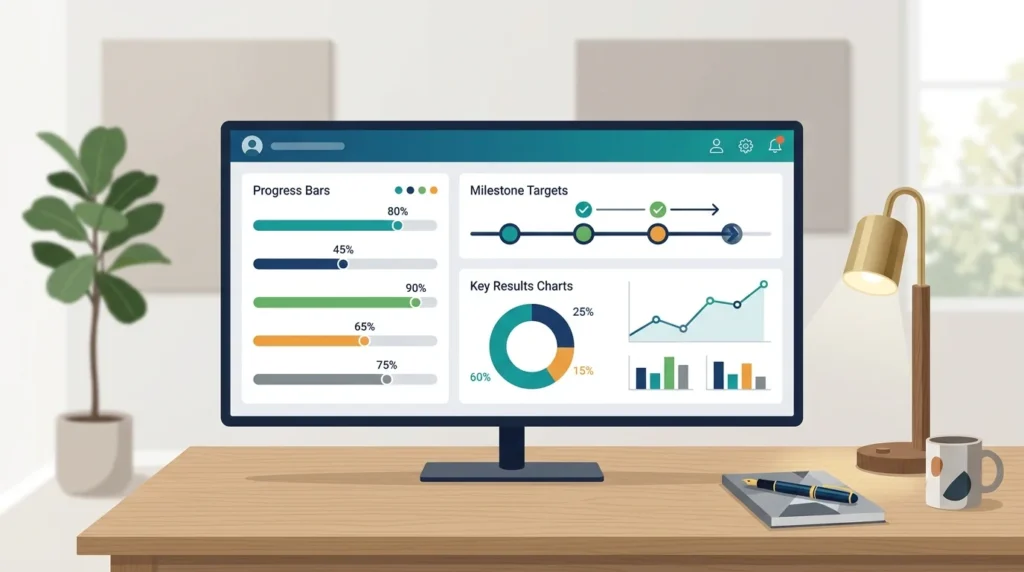
Instead of typing subjective percentage numbers, I use Notion formulas paired with rollups. When I link multiple active projects to an annual goal, Notion counts the total completed projects and displays a visual progress bar automatically. Seeing that bar creep toward one hundred percent provides consistent intrinsic motivation without manual spreadsheet updates. For example, if my quarterly milestone is launching a digital storefront, related projects like drafting copy, designing assets, and configuring payment gateways each contribute a proportional share to the overall goal completion metric.
If you want to skip building these relational formulas by hand, the pre-built dashboards in the 200+ PLR Notion Templates Bundle include fully automated progress bars, goal links, and customizable property views.
Integrating Projects Tasks And Habit Logs
The real power of Notion emerges when your high-level plans communicate seamlessly with daily routines. In my setup, my Tasks database links directly to Projects, while my Daily Tracker database monitors recurring routines like meditation, hydration, and exercise. Having these databases talk to each other eliminates the friction of jumping between disparate tracking tools.
When I open my project dashboard, I see only the tasks associated with that specific outcome. Meanwhile, my master dashboard aggregates incomplete tasks across all projects into a single unified view sorted by due date and urgency. Connecting these elements prevents cognitive overload because I never have to navigate between ten separate pages to plan my day. Every task is anchored to a concrete deliverable, ensuring that busywork does not masquerade as genuine progress. You can learn more about building focused habit databases in our deep dive on notion habit tracker dashboard setup.
Furthermore, I integrate a simple automated date property inside my daily task database. Using recurring templates, Notion automatically spawns my recurring checklist items every weekday morning at five o’clock. By the time I sit at my desk, my daily canvas is populated with my standard operating procedures, allowing me to dive straight into deep execution mode without deciding what to tackle first.
Building The Morning Command Center
Your morning dashboard must load quickly and present minimal cognitive friction. When I sit down at my desk with a cup of coffee, I want clear answers to two straightforward questions: What is my primary objective today, and what secondary commitments require my attention?
I layout my command center with three distinct sections. At the top left, a linked view of my Tasks database shows items scheduled for Today, filtered to show only High and Medium priority tasks. To the right, a compact Habit Tracker strip allows me to check off morning routines in two clicks. Directly beneath, an Active Projects gallery displays current sprint deadlines along with their real-time progress percentages.
I also embed a lightweight quick-notes block directly beside my task list. Whenever an unexpected phone call or sudden idea interrupts my flow, I paste it into this temporary holding zone instead of switching context to another app. At midday, I spend two minutes triaging those notes into their appropriate database locations. This streamlined interface ensures I spend my mornings producing real creative work rather than endlessly organizing databases. For more ideas on organizing comprehensive digital stores, explore the resources on plrbizhub.com.
Connecting Knowledge Archives To Actionable Work
A life operating system is incomplete without a reliable archive to store references, invoices, receipts, and learning notes. By connecting my active project databases to an external reference archive, I keep my primary workspace spotless while preserving important documents for future review.
Whenever I conclude a client contract or finish drafting a digital product, I update the project status property to Completed. A database filter instantly removes that entry from my active board and transfers it to my permanent Archive view. That way, my working dashboard stays lean and fast. I also maintain linked views for code snippets, design assets, and marketing swipe files, so whenever I start a new initiative, I can reference past materials instantly. For foundational setup ideas on knowledge storage, check out our guide on how to build a second brain in notion.
Conducting Effective Weekly Reviews
Even the most beautifully designed life operating system will disintegrate without a regular review rhythm. Every Friday afternoon, I run through a standardized fifteen-minute review protocol to close open loops and prepare for the upcoming week.
I begin by clearing my task inbox and rescheduling unfinished to-do items. Next, I review my weekly habit completion scores to identify where my schedule fell out of balance. If I notice my exercise or reading habits dropped, I adjust my calendar blocks for the upcoming days. Finally, I select three essential priorities for the upcoming week and schedule dedicated focus blocks on my calendar. This routine keeps me grounded and prevents overwhelm from building up unnoticed.
I also take two minutes to write a brief sentence summarizing my biggest win and primary bottleneck of the week. Logging these reflections in a dedicated Weekly Ledger database gives me invaluable historical perspective when planning subsequent quarters.
Frequently Asked Questions
Does a life operating system make Notion run slowly?
Notion remains fast if you use linked database views filtered to small record counts rather than displaying thousands of raw rows on a single page.
How often should I restructure my databases?
I recommend sticking to a consistent structure for at least three months before making structural changes. Constant rebuilding wastes valuable execution time.
Can I use this operating system on mobile devices?
Yes, but design a dedicated mobile-optimized page with single-column layouts and quick-action buttons for the smoothest smartphone experience.
Crafting a dependable life operating system provides the quiet structure your mind needs to focus on meaningful creative work day after day.